
Download CoverArtist – AI‑Powered Album Cover Creator for Musicians
Overview
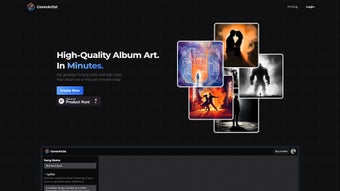
CoverArtist is a cutting‑edge, web‑based AI tool designed specifically for musicians, producers, and independent artists who need eye‑catching album cover art without the cost and hassle of hiring a professional designer. By simply entering key details such as the song title, lyrical snippets, mood descriptors, or even a rough sketch idea, the platform’s deep‑learning algorithms generate three distinct, high‑resolution cover concepts in seconds. Users can instantly preview each design, pick their favorite, and download the final artwork ready for distribution on streaming services, physical media, or promotional material. The interface is intentionally minimalist: no design experience is required, and the entire workflow—from idea input to final download—takes under five minutes on average. For creators who demand fresh visuals on a tight schedule, CoverArtist offers a practical, secure, and cost‑effective solution that eliminates the need for expensive design software or third‑party freelancers.
The application also supports iterative refinement. If the initial trio of covers doesn’t match the artist’s vision, a single click triggers a new set of options based on the same input, or users can adjust the descriptive prompts to guide the AI toward a different aesthetic. Additionally, a lightweight built‑in editor lets users tweak typography, color balance, or add subtle overlays, ensuring the final piece aligns perfectly with branding guidelines. All generated assets are royalty‑free, granting full commercial rights to the user, which is essential for independent musicians looking to monetize their work without legal complications.
Security and privacy are baked into the platform; no personal data is stored beyond the session, and all uploads are encrypted via HTTPS. CoverArtist also integrates with popular music distribution services, allowing users to export metadata alongside the cover image, streamlining the publishing pipeline. Whether you’re releasing a single, EP, or full‑length album, CoverArtist promises a seamless, AI‑driven experience that transforms vague ideas into polished visual identities.
Key Features
- AI‑generated artwork: Three unique cover designs per request, powered by deep‑learning models trained on millions of album covers.
- Fast turnaround: Complete design generation in under 30 seconds, ideal for tight release schedules.
- Custom prompt flexibility: Input song titles, lyrics, mood keywords, or upload reference images to guide the AI.
- Iterative redesign: Regenerate new concepts with a single click or adjust prompts for refined results.
- Built‑in editor: Fine‑tune typography, color palettes, and add overlays without leaving the platform.
- High‑resolution export: Download covers at 300 dpi PNG or JPEG, ready for digital streaming platforms and print.
- Royalty‑free licensing: Full commercial rights granted to the user, eliminating future legal hurdles.
- Secure, encrypted connection: All data transferred via HTTPS with no long‑term storage of user inputs.
- Integration with distribution services: Export metadata alongside the cover image for seamless publishing.
- Cross‑platform accessibility: Runs in any modern browser on Windows, macOS, Linux, Android, and iOS.
Beyond these headline features, CoverArtist delivers a responsive design that adapts to various screen sizes, ensuring a consistent experience whether you’re working from a desktop studio or a mobile tablet on the go. The platform’s AI model continuously learns from user feedback, meaning the more it’s used, the better it becomes at interpreting musical themes and visual trends. For artists who value creative control, the tool balances automation with manual adjustments, giving you the best of both worlds: speed without sacrificing personalization.
Support is another strong point. CoverArtist provides an extensive knowledge base, video tutorials, and a community forum where users share tips on prompt crafting and design tweaks. The service also offers a 24/7 chat widget for real‑time assistance, ensuring that any technical hiccups are resolved quickly—crucial when you’re racing against a release deadline. All of these elements combine to make CoverArtist a reliable, all‑in‑one solution for modern musicians.
Installation & Usage Instructions
Because CoverArtist is a web‑based solution, there’s no traditional “installation” process. Getting started is as simple as opening a browser, navigating to the official website, and creating a free account. Below is a step‑by‑step guide that walks you through the entire workflow, from registration to final download.
Step 1 – Create Your Account
Visit coverartist.com and click “Sign Up.” You can register using an email address or link a Google or Apple ID for quicker access. After confirming your email, you’ll be directed to the dashboard where you can manage projects, view generated designs, and monitor usage credits.
Step 2 – Input Your Creative Brief
Click “New Project” and fill out the brief with the following fields:
- Album Title: The main text that will appear on the cover.
- Artist Name: Optional but recommended for branding.
- Lyrics / Mood Keywords: Provide a short excerpt or descriptive words (e.g., “dark synthwave,” “acoustic sunrise”).
- Reference Images (optional): Upload a sketch or mood board to guide the AI’s style.
Step 3 – Generate Designs
Press “Create Covers.” Within 20‑30 seconds, three AI‑generated concepts appear. Hover over each thumbnail to view a larger preview and click “Select” on the one that resonates most. If none fit, use the “Regenerate” button or tweak your prompts and try again.
Step 4 – Fine‑Tune Your Choice
Once a design is selected, the built‑in editor opens. Here you can edit the title and artist text fonts, sizes, and positioning; adjust color balance, contrast, or apply filters; and add additional graphics or overlay shapes. The editor is intentionally simple yet powerful enough for most branding needs.
Step 5 – Download & Export
When satisfied, click “Download.” Choose between PNG (transparent background) or JPEG (standard). Both options provide 300 dpi files suitable for digital platforms and print. If you plan to upload to a distributor, select “Export with Metadata” to embed album details automatically. The platform saves progress automatically, so you can pause and resume later without losing work.
Compatibility, Pros & Cons, FAQ & Conclusion
Compatibility
CoverArtist runs entirely in the cloud, meaning it is compatible with any device that supports a modern web browser (Chrome, Firefox, Safari, Edge). Whether you’re on Windows 10/11, macOS Ventura, Linux, Android 13, or iOS 17, the experience remains consistent. No additional plugins or downloads are required, and the platform automatically adjusts to screen resolutions, ensuring high‑quality previews on both desktop monitors and mobile screens.
Pros
- Lightning‑fast AI generation saves time.
- No design expertise needed; intuitive UI.
- High‑resolution, royalty‑free outputs.
- Cross‑platform accessibility via browser.
- Built‑in editor for final tweaks.
- Secure, encrypted data handling.
Cons
- Relies on an internet connection; offline use not possible.
- Limited to three initial concepts per request (additional generations may require credits).
- Customization depth is less than full‑featured graphic design suites like Photoshop.
Frequently Asked Questions
Can I use the generated covers for commercial releases?
Yes. All images created with CoverArtist are provided under a royalty‑free license, granting you full commercial rights to use the artwork on streaming platforms, physical media, merchandise, and promotional materials.
Is there a free version or trial?
CoverArtist offers a free tier that lets you generate up to three cover sets per month. For unlimited access, higher‑resolution downloads, and priority support, a paid subscription is available.
What file formats are available for download?
You can download covers as PNG (transparent background) or JPEG (standard), both at 300 dpi. The platform also supports exporting embedded metadata for direct upload to distribution services.
Can I edit the AI‑generated design after download?
Absolutely. The downloaded files are standard image formats, so you can open them in any graphic editor (Photoshop, GIMP, Affinity) for further refinement if needed.
How secure is my data during the design process?
CoverArtist uses HTTPS encryption for all data transfers and does not retain your inputs after the session ends, ensuring privacy and security for your creative ideas.
Conclusion & Call to Action
For independent musicians and small labels, CoverArtist delivers a powerful blend of speed, affordability, and creative flexibility that traditional design routes simply can’t match. By leveraging AI, the platform eliminates the steep learning curve of graphic design software while still offering enough customization to maintain artistic integrity. Whether you’re on a tight deadline, operating on a limited budget, or simply want to experiment with visual concepts quickly, CoverArtist provides a reliable, secure, and user‑friendly solution.
Ready to give your next release a professional look without breaking the bank? Sign up for a free account today and start generating stunning album covers in seconds. Upgrade to a premium plan whenever you need unlimited designs, higher‑resolution assets, and priority support—your music deserves artwork that stands out, and CoverArtist is here to make that happen.
Pros: Fast AI generation, royalty‑free output, cross‑platform, intuitive UI.
Cons: Requires internet, limited free generation quota.



.png)



